 Starvard.Starvard.
Starvard University · School of Technology
How a small browser game got people who idle, walk, run, jump, wave and sit like a real third person game: the rig standard that came first, the six animation clips every character carries, the open avatar library that supplied the bodies, the tiny loader that swaps them into a running game, and the honest bill, in tokens and dollars, for having an AI do the heavy lifting. Every screenshot in this course is taken from the real game and its real character files.

The whole course in brief
The ten lessons
Lesson 1
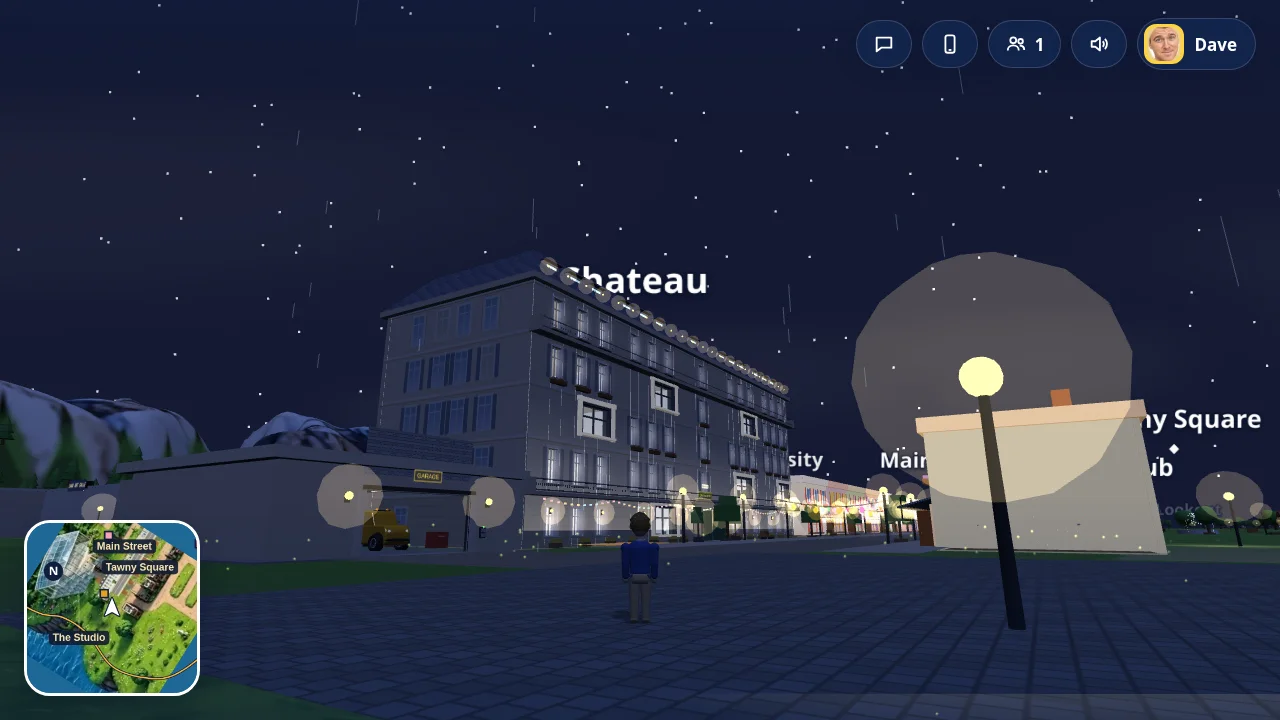
When players say a browser game feels like Grand Theft Auto, they almost never mean the graphics budget. They mean a short list of behaviours. The camera floats behind the character and a little above, so you see your person in the world instead of seeing through their eyes. The character idles with a bit of life in them, walks, breaks into a run, jumps, sits down in vehicles and on benches, and waves at people. A minimap sits in the corner. The whole thing responds instantly, on a phone, in a browser tab, with no install.
That list is good news. It means the hard part is not modelling a movie quality human. The hard part is motion that blends: a walk that starts and stops without popping, a run that grows out of the walk, a jump that takes off and lands, a wave that rides on top of whatever the legs are doing. Get the motion system right and even a modest character reads as GTA style. Get it wrong and a beautiful model still moves like a shop mannequin.
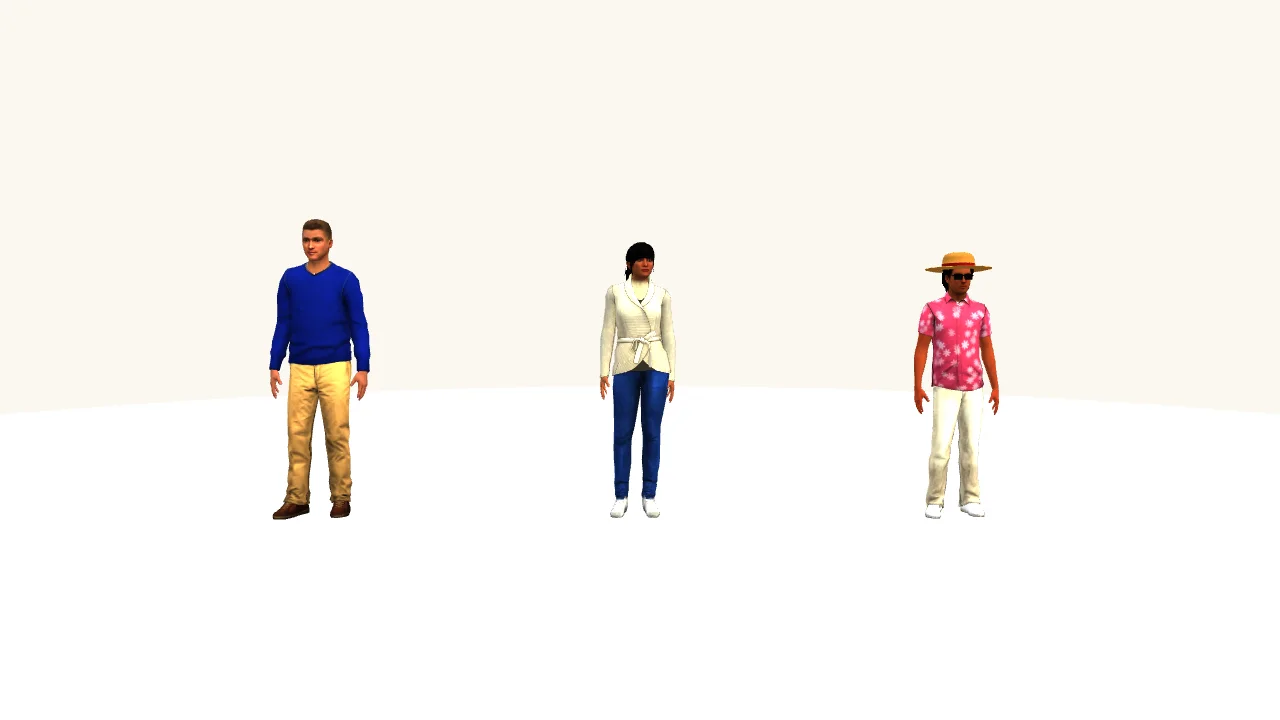
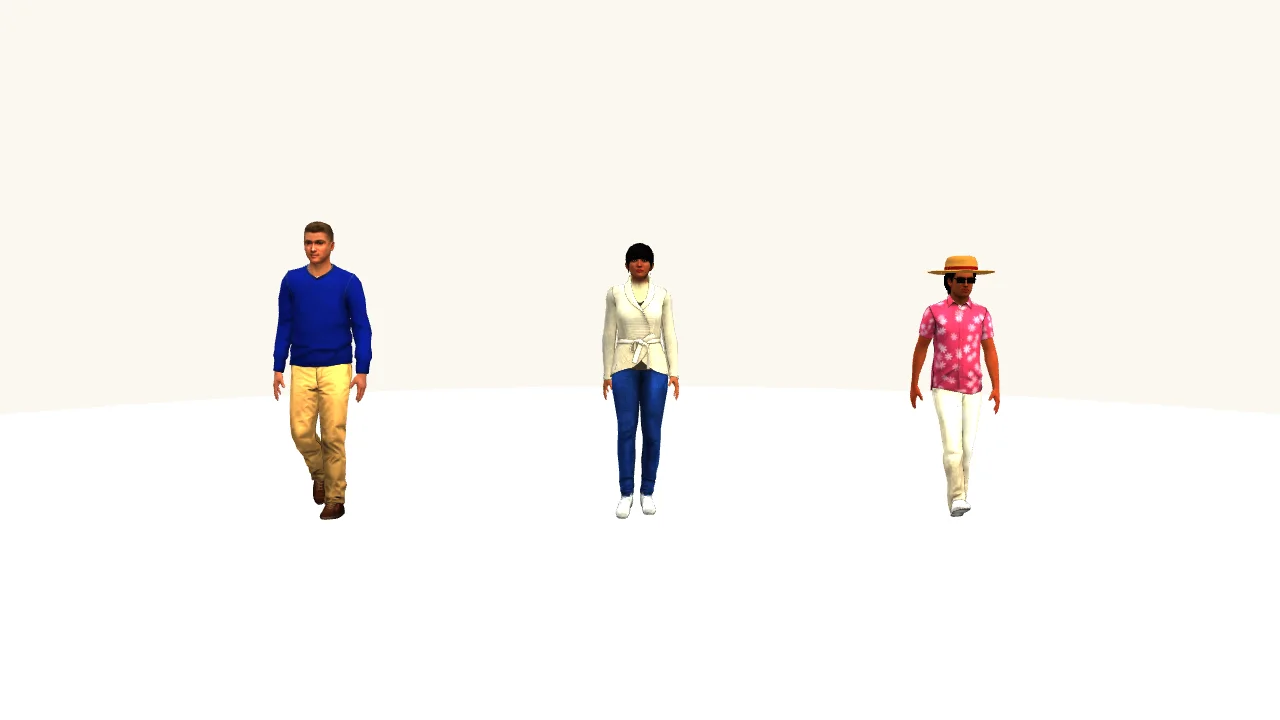
This course is the full case study of one game that made that jump: E2 World, a free browser island game whose cast are real people. The three finished models are pictured at the top of this page: the player character in a blue sweater and khaki chinos, Sam in a cream knit and jeans, and Harsh in a pink floral shirt and a straw hat. They shipped in the game's V 0.13 release on November 13, 2026. Everything below is exactly how they were made, including the routes that failed first.
Lesson 2
The single most valuable decision in this whole project was made before any character existed: one skeleton for everybody. Every character in the game, however their mesh is made, stands on the same 19 joint human rig, with the same joint names, in the same units. A model that does not match the standard does not ship, full stop.
| Joint group | Joints | Why it matters |
|---|---|---|
| Core | Hips, Spine, Chest, Neck, Head | Lean, breathing, looking around, the sitting bend |
| Arms (x2) | Arm, ForeArm, Hand | Walk swing, the wave, steering wheels, holding things |
| Legs (x2) | UpLeg, Leg, Foot, Toe | Walk and run cycles, jump crouch, sitting at a desk or in a car |
The rest of the standard is five lines long, and every one of them earned its place by breaking something when it was ignored:
With the standard fixed, characters become interchangeable parts. A body from any source can be converted onto the rig, any clip can be retargeted onto any character, and the game code never learns where a body came from. That is what made the fifth route in Lesson 4 possible: when a better body source turned up, only the files changed.
Lesson 3
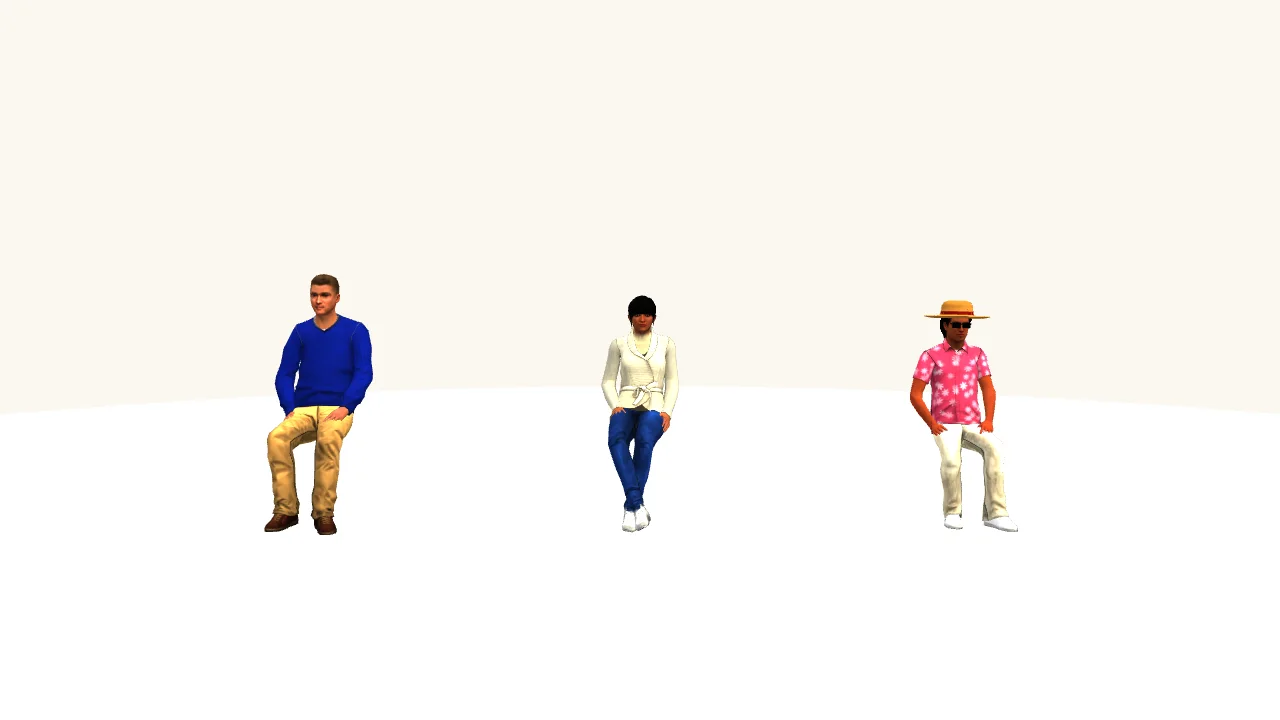
Six clips cover almost everything a person does in a friendly open world game. Every character carries the same six, with these exact names, all animated in place: the character walks on the spot, and the game moves the body through the world. In place animation is what lets one clip serve any speed, any slope, any vehicle-free moment, because the motion and the movement are separate dials.
| Clip | Length | Loops | Ground speed | Used for |
|---|---|---|---|---|
| Idle | 4.0 s | Yes | 0 | Standing, breathing, waiting, talking |
| Walking | 1.2 s | Yes | about 1.0 m/s | Ordinary movement on foot |
| Running | 0.73 s | Yes | about 2.9 m/s | Stick pushed to the edge, sprinting |
| Jump | 1.0 s | No | 0 | The whole arc of a jump, take-off to landing |
| Waving | 2.8 s | No | 0 | Greetings, played over the legs' current clip |
| Sitting | 4.0 s | Yes | 0 | Chairs, benches, and as a base pose for seats |
Lengths and speeds above are the player character's; Sam and Harsh carry the same set at their own heights and paces (their walks are animated at 1.18 and 0.88 metres per second). Three details separate clips that blend from clips that fight:

Lesson 4
This is the honest history, because the failures are where the tuition is. The game needed its real cast, recognisable people, moving properly, in a browser. Five routes were tried.
Route 1: flat art cards. The game began with illustrated 2D characters, portrait art on cards that glide around the world. Charming, cheap, and instantly recognisable, but they cannot turn, sit in a car, or cast a shadow, and the moment the world went fully 3D they looked like paper cutouts in a diorama. They survive as an optional look in the game's phone settings.
Route 2: bodies built from code. A function in the game builds a person from shapes (a lathe-turned torso, capsule arms and legs) dressed by a colour recipe per character, with their real face as a texture. This worked from day one and still runs underneath everything (Lesson 9). Its ceiling is style: it reads as a friendly toy person, not a GTA person.
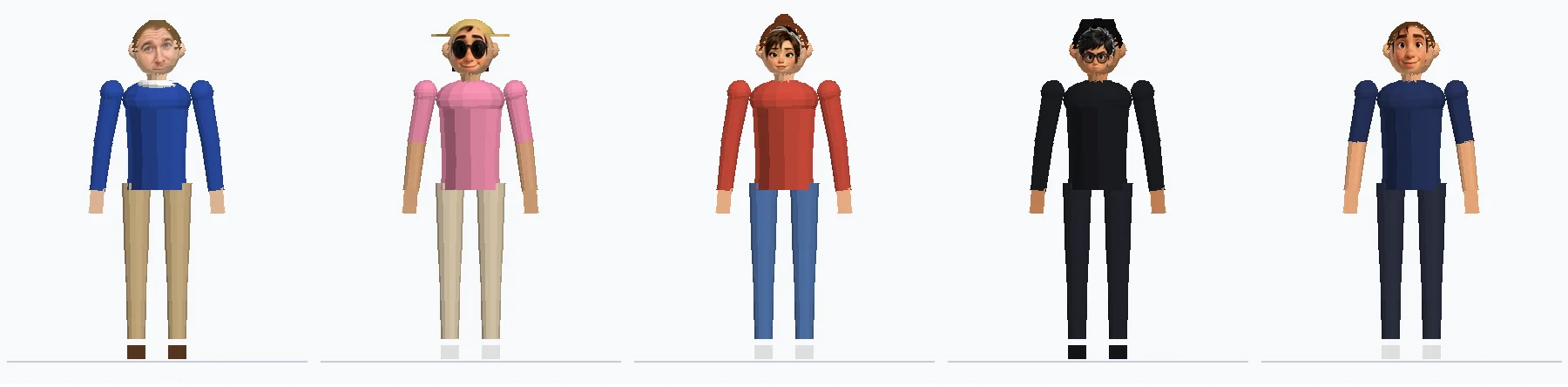
Route 3: hand-built 3D masters. Next, full GLB masters were built programmatically to the rig standard: correct skeleton, all six clips, the right outfits, and each person's real face mapped onto the head. On paper, perfect. On screen, stiff low-poly bodies wearing photograph faces, and the verdict from the game's owner was two words: not good. The lesson cost a day and is worth a fortune: a technically correct character that looks wrong is wrong. Correct rig, correct clips, wrong art direction.
Route 4: image-to-3D services. The fashionable route: upload a character picture to Meshy or Tripo, get a textured mesh, auto-rig it, add animations. Three problems. Both services need your own account and spend credits, so an AI agent cannot simply go and do it for you. The likeness is a lottery: a generated sculpt of a real person comes back as a cousin, not the person. And the skeleton you get is the service's skeleton, not your standard, so every model still needs conversion before the game can use its motion. For invented characters this route is genuinely good (Lesson 10 prices it). For a cast of real people, it was the wrong tool.
Route 5: an open avatar library, restyled. Microsoft Research published the Rocketbox library: 115 professionally made human avatars, fully rigged and textured, with 417 animations, under the MIT licence. Pick the avatar whose build and face shape are closest to your person, restyle the outfit and hair to match their look, retarget the six standard clips onto the rig standard, and the character is suddenly a real 3D person with broadcast quality motion, for zero dollars and a clear licence. That is what shipped. Lesson 5 is the recipe.
One more thread ran through every route: faces kept breaking. Crops drifted, textures landed rotated, a fix for one character slid another's face sideways. Faces got their own contact sheets and their own fix rounds, three strips of test renders in a row, before they behaved. Budget for faces as a separate job (Lesson 6), not as a detail of the body job.
Lesson 5
Here is the exact pipeline that produced the three shipped characters. It assumes your rig standard (Lesson 2) and clip list (Lesson 3) already exist.
The full asset list for one finished character is short enough to print on the course page:
| Asset | What it is | Size |
|---|---|---|
| sam.glb | Sam: skinned mesh, restyled textures, 19 joints, six clips | about 400 KB |
| harsh.glb | Harsh: same standard, hat and sunglasses as extra primitives | about 380 KB |
| Player model GLB | The player character, same standard again | about 330 KB |
| faces/<id>.png | The person's face texture, used by the code-built body | one image each |
| LOOK recipe | Twenty or so colour and style values per character, in the game code | a few lines |
| e2-models.js | The loader module shared by every character (Lesson 7) | about 11 KB |
Lesson 6
Players forgive a generic body instantly. They never forgive a wrong face. The game's cast are real people, so the face rules were set in writing before any modelling:
Mechanically, the face lives in two places. The code-built body wears the real face as a texture on its head, painted or photographed, kept bright and unlit so it matches the picture. The GLB model carries its own head, chosen and restyled to be as close as selection allows. At the distance the GTA camera actually sits, face shape, hair, skin tone and outfit agree, and recognition lands.
The craft lesson from the fix rounds: test faces on a contact sheet, all of them, every time. One render with every character's head in a row shows a drifted crop or a rotated texture in seconds. Testing one character at a time is how a fix for one face quietly slides another.
Lesson 7
The models would be worthless if wiring them in meant rewriting the game. Instead, one small module, e2-models.js, sits between the game and the files, and the game talks to it in exactly two calls:
Everything else is the module's problem, and it is engineered around one principle: the game must never wait for a model, and never break without one.
Adding a character, once their file exists, is one line in the module's file table and one GLB dropped in the models folder. Sally, Chadwick, Dinesh and the rest of the cast still wear their code-built bodies today, and each can graduate the same way whenever a file is ready.
Lesson 8
A GTA character does two kinds of moving. Ordinary life (standing, walking, running, jumping) is repetitive and belongs to motion clips. Posed moments (waving is the borderline case, plus emotes, sitting in a car, holding the train rail) are one-offs the game invents on the fly. The loader runs both systems on the same bones and blends between them:
Clip mode. Four clips carry weights that slide with speed. Idle owns the character at rest. Walking fades in as speed rises from 0.3 to 2.2 metres per second. Running takes over from walking between 5.5 and 12. The step rate is not fixed: the stride clock speeds up with the character, from 0.85 times at a stroll to 1.75 times at a sprint, capped so feet slide a little rather than moonwalk a lot. Waving fades in and out over the top, and the jump weight follows how airborne the body is. The game's own bounce is cancelled out of the model, because the clips carry their own.

Rig mode. The game has always posed its code-built bodies directly: a handful of pivots with names like lL (left hip), kL (left knee), aR (right shoulder), eR (right elbow) and head. The loader keeps a translation table from those nine pivots to the model's real bones, precomputed against the rest pose, so when the game poses its simple body (an emote, a driving pose, sitting on the train), the loader copies the pose onto the model's skeleton in the model's own axes. Every animation the game ever had keeps working, unmodified, on the new bodies.
The blend. Switching modes is not a cut. The loader snapshots the bone rotations, flips mode, and eases across 0.16 seconds with a smoothstep. That small number is the difference between a character who glides from a wave into a walk and one who snaps like a folding ruler. Detecting which mode should be live is equally plain: if the game posed a pivot since the last frame, or an emote is active, rig mode wins; otherwise clips run.
Lesson 9
Under every GLB in the game stands a complete character built from raw geometry, and it deserves its own lesson, because for most of the cast it is still the only body they have. The builder, makeRigChar, assembles a person from turned and stretched shapes: a lathe profile for the torso (eleven points from hip to neck), capsules for arms and legs, spheres for hands, ears and shoes, a shaped head with the character's face texture on the front, and hair built to a named style: short, messy, ponytail, bun, long, or a hat over any of them.
What each character wears is data, not code. One recipe per person in a table called LOOK:
Shirt, trousers, hem, skin, hair, hairstyle, sleeves, knitwear, hat, shoes: read the two entries and you can see the two people. Stripes, jackets, collars, decals, necklaces and beards are options in the same table. Changing a character's outfit is editing one line, which is why the game's phone can offer a Look setting at all.
Its animation, animChar, is one sine wave. A phase advances with speed; hips and knees swing against each other, shoulders counter-swing, the head bobs, and emotes layer extra rotations on top. It is roughly forty lines, it has never crashed, and it makes a toy person walk convincingly enough that the game shipped on it for months. The GLB models did not replace it. They stand on it: it builds the character, poses the character, and hands over to the model only when the model is ready.
Lesson 10
Everything the shipped route used is free. That was a choice, not a constraint: here is the honest map of the alternatives, so you can choose with your eyes open. Prices checked November 13, 2026, and they move; treat every figure as an estimate.
Motion and rig sources
| Source | What you get | Licence and cost |
|---|---|---|
| Microsoft Rocketbox (used here) | 115 rigged avatars, four detail levels, 417 animations, facial blendshapes | MIT, free. Keep the copyright notice in your credits |
| Mixamo | Thousands of polished clips and a large character set, one standard skeleton | Free with an Adobe account; the classic next step after Rocketbox |
| KayKit | Stylised low poly characters and town packs, game ready (this game uses its town pack) | CC0, free, no credit required |
| Quaternius Universal Animation Library | A standard humanoid with a broad clip set, built for retargeting | CC0, free |
| Meshy and Tripo preset clips | Animation libraries attached to their generated models, plus text to motion | Credit based, priced below |
| Cascadeur, AccuRIG | Make your own: physics aware keyframing, and free auto-rigging of your own meshes | Free tiers exist; for when a stock clip does not exist |
| Video mocap (Rokoko, DeepMotion and friends) | Film a person, get a clip. The fastest route to a signature move | Subscription tools; wonderful for one special animation |
Character sources
| Source | Best for | Cost |
|---|---|---|
| Rocketbox, restyled | Real people at gameplay distance, clear licence | Free (MIT) |
| Meshy image-to-3D | Invented characters from one picture, textured and rigged | About $0.60 per finished model on the $20 a month Pro plan (1,000 credits; a textured model is about 30 credits, rigging free in the web app) |
| Tripo image-to-3D | Same job, more credits per dollar | Pro is $20 a month with 3,000 credits; model 15, texture 10, rig 20, an animation 20, so about $0.45 per rigged, animated character |
| VRoid Studio, MakeHuman | Building a person by hand with sliders, VRM or mesh export | Free |
| KayKit and Quaternius packs | Stylised casts that read beautifully at small sizes | Free (CC0) |
The Claude bill. The conversion, restyling, retargeting checks, loader module and its fixes were done by Claude working in the game's repository (Claude Code), directed by a person. There are two ways to pay for that, and the right one depends on how often you do it:
| Model | API price, per million tokens in / out | Rough cost of this job, API billed |
|---|---|---|
| Claude Opus 5.5 | $4 / $20 | about $15 to $60 |
| Claude Sonnet 5.5 | $2 / $10 | about $8 to $30 |
| Claude Haiku 5.5 | $0.10 / $0.50 (prompts to 100K) | under $2, for the mechanical steps only |
| Claude Fable 5.1 | $10 / $50 | about $40 to $150, more than this job needs |
The arithmetic, so you can check it: a job like V 0.13 (three characters converted and verified, a loader written into a game file of about 625 KB, then several rounds of render, inspect and fix) burns roughly 3 to 8 million tokens in total, most of them cached input reads at a tenth of the input price. Multiply your own token guess by the rates above and you have your estimate. On a subscription the same work is simply inside the flat month: Claude Code comes with Pro at $20 a month, Max at $100 or $200, and this build was done that way, across about two days of back and forth, most of it waiting on renders and verdicts rather than on the model. The practical guidance: prototype and convert on Sonnet, call Opus in for the loader and the stubborn bugs, and let Haiku do renames, tables and other clerical work. Hiring the same outcome the human way (a freelance character artist to model, rig and animate one original character) is normally quoted in days per character and hundreds of dollars per character, which is the comparison that makes the table above look the way it does.
Total cash spent on the shipped characters: zero dollars in assets, a share of one Claude subscription, and about two days of a person's direction, testing and taste. The taste, it turns out, was the scarce input all along.
Sources
Starvard is a free university being built right now by kind, hard-working people. Do a first small task with us, like checking a course, adding a book to the library, or testing pages on your phone, and get $10 for it.
Get $10: help us build →